
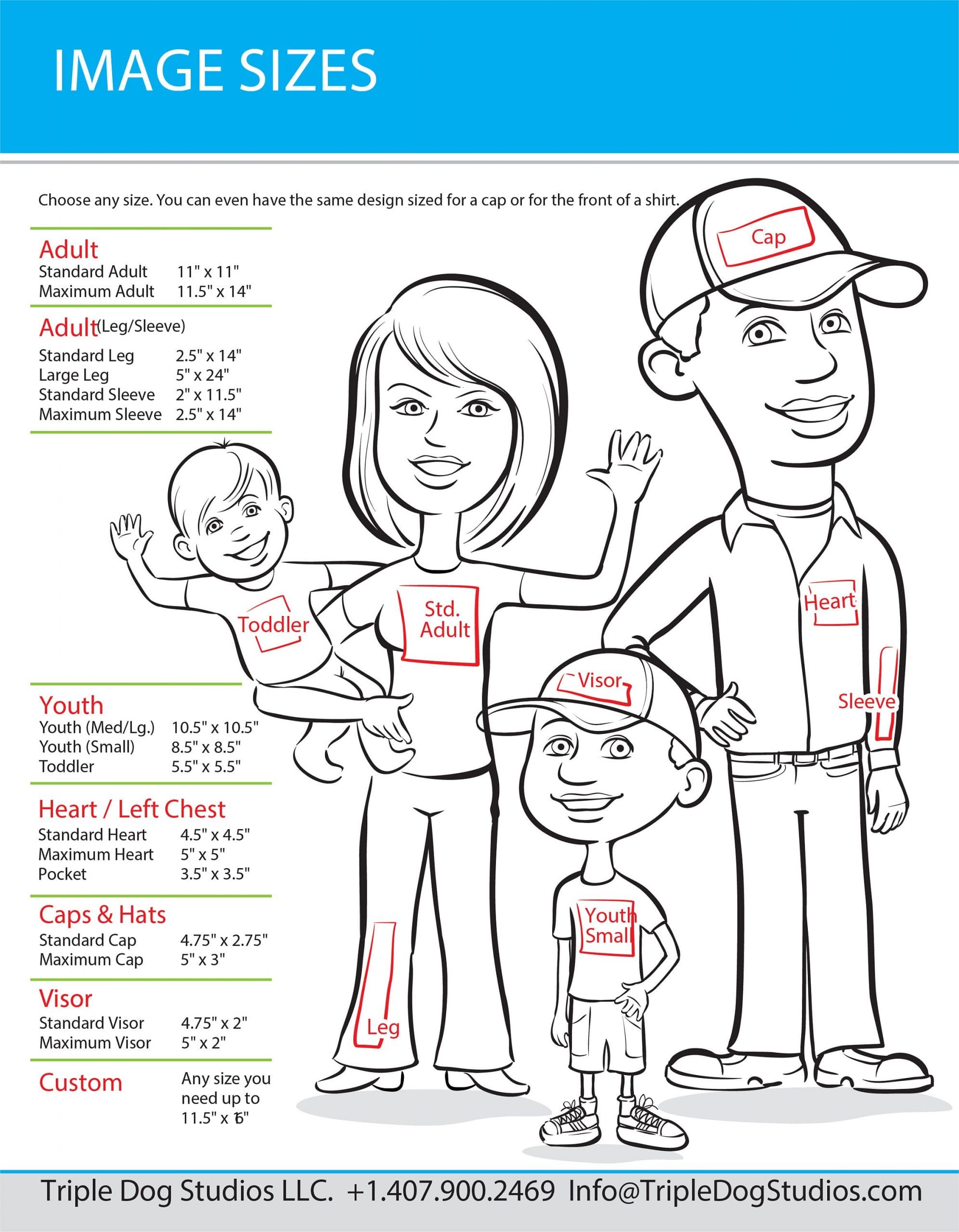
Finding the right DTF transfer sizes for your project is essential for professional results. This guide covers the top 15 most popular sizes used across adult, youth, toddler, and specialty garments. For standard garment dimensions, refer to a standard US garment sizing chart.
- Small Pocket: 3″x3″ — Perfect for small logos or designs.
- Large Pocket: 4″x4″ — Ideal for larger pocket graphics.
- Infant: 5″x5″ — Sized for infant clothing.
- Toddler: 7″x7″ — Designed for toddler apparel.
- Youth: 8.5″x8.5″ — Suitable for youth sizes.
- Adult (S-XL): 10.5″x10.5″ — Covers standard adult sizes.
- Adult+ (2XL+): 12″x12″ — For plus sizes.
- Oversized: 15″x15″ — Large, impactful designs.
- Sleeve: Standard 2″ x 11.25″. For a bolder look, size up to 2.5″ x 14″.
- Full Front: Adult 11″ x 11″, Youth 9″ x 9″, mixed orders 10–10.5″.
- Left Chest: Typically 4.5″ x 4.5″, pocket prints around 3.5″ x 3.5″.
- Short Sleeves: Standard 3″ x 3″. For smaller youth sizes, reduce to 2″–2.5″.
- Cap and Visor: Caps at 4.75″ x 2.75″, visors 2″ height or less.
- Yoke Prints: Branding size between 2″–3″ wide.
- Inside Tag Prints: Recommended 2.5″–3″ wide.
When selecting DTF transfer sizes, consider the specific apparel type and intended design placement. Larger transfers work well for back designs on hoodies or jackets, while smaller sizes are perfect for logos on caps or sleeves. Choosing the right size enhances visual appeal and optimizes material use, saving costs on bulk orders.
DTF Transfer Sizes — Save Money With Gang Sheets
The best way to maximize your savings is to order a DTF Gang Sheet and group as many images together as possible. The more designs you fit on a single sheet, the lower your cost per print. We charge a flat wholesale rate no matter how much or how little you order — same best price whether you’re ordering one gang sheet or a hundred. No volume tiers, no price games. We’re here to help you grow your business, even when you’re starting small.
Want to estimate your cost per image? Try our DTF Cost Calculator.
Custom size DTF transfers
For one design at one exact size, such as an 11″ x 11″ adult full front or a 3″ x 3″ pocket print, order custom size DTF transfers. Enter the length, width and quantity, upload your image, and add it to your cart. We print the transfer at the size you enter, on matte film you can peel hot or warm. Upload artwork at 300 DPI or higher. Orders placed before 4 PM ET, Monday to Friday, go into production the same day.
Measure your garment first and compare it with the size list above. If you have several designs or are not sure of the size, the gang sheet builder lets you arrange them on one sheet. Shops and brands ordering in bulk can see our wholesale DTF transfers page.
DTF Transfers Terminology Guide
Understanding key terms in heat transfer printing is crucial for precise design placement and sizing:
- Print Location: The general area on the garment where the print is applied (e.g., left chest, full back).
- Print Placement: The specific spot on the garment where the design is positioned, varying by garment size and preference.
- Print Area: The actual surface area the design covers, accounting for pockets, seams, or buttons.
- Print Size: The dimensions of the design itself, measured from the artwork.
- Standard Size: Commonly used size ranges based on print location and garment type.
- Oversize: Any design larger than standard but smaller than the maximum garment size.
- Maximum Size: The largest possible dimensions for a print on a specific garment.
- Anchor Point: A specific point in the design used for alignment, especially important for asymmetrical designs.
Why Choose DTF-Prints.com?
- Wholesale Prices for Everyone: Flat-rate pricing means you get the best wholesale price on every order — no matter the size.
- Fast Turnaround: Orders processed same or next business day. Free ground shipping on orders over $35.
- Easy Ordering: Visit our gang sheet builder to arrange your designs, or order custom sizes individually.
- Rush Orders: Call +1 (386) 327-0009 for expedited processing.
Application & Care
Apply transfers under firm pressure at 300°F (149°C) for 12 to 15 seconds. Peel hot while the transfer is still warm. For specialty films (glitter, glow in the dark, or other special films), peel cold instead — wait until completely cool before peeling.
Wash garments inside out in cold water and tumble dry on low for long-lasting results.